
Simple Player Movement
A downloadable asset pack
Player Movement 2D
[1.1.1] - Website link (full docs): https://www.sillylix.com/Docs/2dMovement/Simple-2dMovement.html
A simple, flexible, and lightweight 2D movement system for Unity using Rigidbody2D.
Designed for platforms and top-down games, this script is ideal for fast prototyping while still being robust enough for full projects.
✨ Features
-
Camera Follow System – Smooth camera movement that follows the player
-
Physics-Based Movement – Uses
Rigidbody2Dfor reliable physics behaviour -
Horizontal & Vertical Movement – Toggle axes to support platformed or top-down game play
-
Jump System
-
Single jump
-
Double jump
-
Coyote time (jump grace period)
-
Jump buffer (queue jump before landing)
-
-
Ground Detection – Raycast-based ground check with optional debug visualization
-
Dash System – Adjustable dash speed, duration, and key
-
Fast Fall – Hold Down Arrow or 'S' to fall faster while airborne
-
Input Normalization – Prevents diagonal speed boost
⚙️ Setup Instructions
1️⃣ Adding the Script
-
Attach PlayerMovement2D to your player GameObject
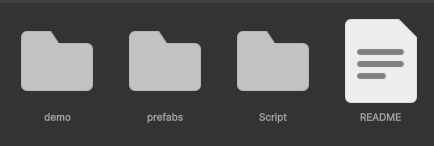
(or use the premade player prefab found in the Prefabs folder) -
The script automatically adds a Rigidbody2D
-
A Collider2D is required (any type works — Unity enforces this)
2️⃣ Configuring Movement
-
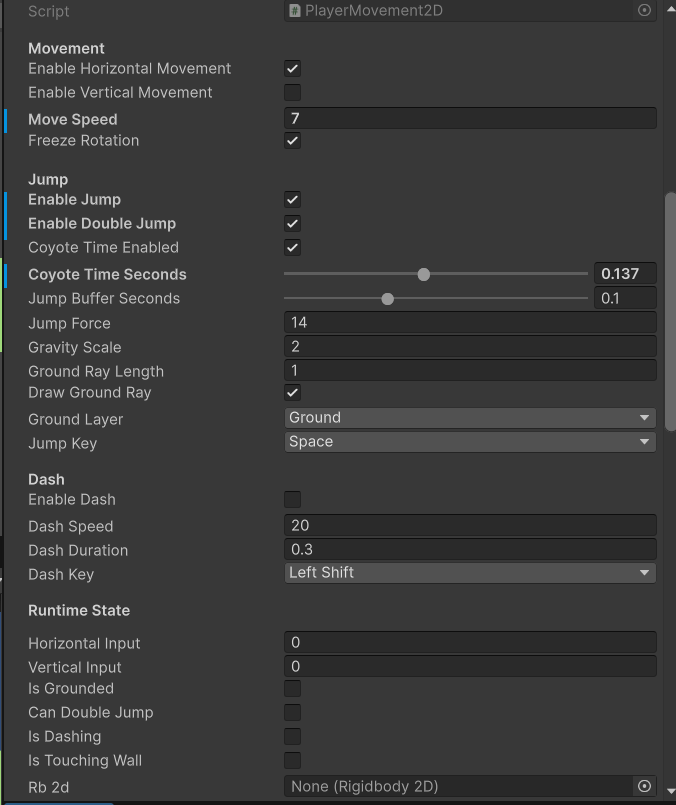
Enable or disable:
-
Horizontal movement
-
Vertical movement
-
-
Set your desired movement speed
-
Diagonal movement is automatically normalized
3️⃣ Setting Up Jumping
-
Enable Jump for basic jumping
-
Enable Double Jump if needed
-
Configure:
-
jumpForce -
gravityScale -
groundRayLength
-
-
Assign the Ground Layer so the script knows what counts as ground
-
Optionally enable Draw Ground Ray to visualize the raycast in the Editor
-
Set the jump key (default: Space)
Additional jump features:
-
Coyote Time – Jump shortly after leaving the ground
-
Jump Buffer – Queue jump input just before landing
4️⃣ Enabling Dashing
-
Enable Dash
-
Set:
-
dashSpeed -
dashDuration
-
-
Assign a dash key (default: Left Shift)
5️⃣ Camera Setup
-
If using the player prefab, remove your default camera
→ the smooth camera is already included -
Or:
-
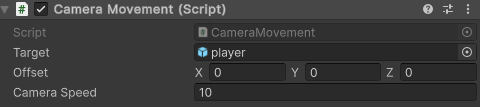
Add CameraMovement to any Camera
-
Assign the player as the target
-
Adjust offset and camera speed as needed
-
🎮 Controls
-
Move: Arrow keys or WASD
-
Jump: Space (if enabled)
-
Dash: Left Shift (if enabled)
-
Fast Fall: Hold Down Arrow while airborne
📦 Requirements
-
Unity Engine 6000+ (should also work on old ones. not tested)
(Tested with 6000.0.61f1) -
Rigidbody2D & Collider2D
-
Basic knowledge of C# and Unity components
📜 License
Custom Asset License – 2025 Sillylix
-
Free to use in personal and commercial games
-
You may modify the asset for your project
-
You may NOT:
-
Redistribute or sell the asset as a standalone file
-
Include it in another asset pack or template
-
Claim the asset as your own work
-
Attribution is not required, but greatly appreciated ❤️
Assets are provided “as is”, without warranty of any kind.
🤖 AI Assistance
This description was refined with the help of AI to improve clarity.
Some code and comments were created with AI assistance (GitHub Copilot).
Download
Click download now to get access to the following files:
Development log
- simple 2d movement - change log [1.1.1]97 days ago
- Change Log 1.1.097 days ago

Comments
Log in with itch.io to leave a comment.
If you find some bug or want new feature then comment it here and i will try to fix/add it :)